Everything you need to know about Checkout
Last updated: May 2, 2026
Dotfile integrates with Checkout.com as one of its providers for Identity Verification with Liveness (IDV). This check combines ID document scanning with a real-time liveness test to confirm that the person submitting a document is genuinely present and matches the identity on the document.
Identity Verification with Liveness (IDV) goes beyond simply scanning a document. The end user is asked to capture a video of their ID document and their face in real time. Checkout.com then:
Checks that the document is authentic and has not been tampered with
Matches the face on the document with the person in the video
Runs liveness detection to confirm the person is physically present, preventing the use of photos or pre-recorded videos
The result is a reliable, fraud-resistant identity check that supports KYC (Know Your Customer) and AML compliance requirements.
For more detail on how Checkout.com's Identity Verification technology works, refer to the Identity Verification documentation.
The Verification Lifecycle
When a verification is triggered through Dotfile, it follows a structured lifecycle managed by Checkout. Understanding this flow helps you interpret the statuses returned in your results.
Verification-level statuses:
StatusMeaning | |
| The verification has been created |
| Waiting for the user to begin |
| The user is actively capturing their document/video |
| Checkout is processing the result |
| Verification successful |
| Verification failed |
| Could not produce a result after all attempts |
Service levels
Checkout is the only IDV provider on the Dotfile platform that offers multiple service levels. You can choose the one that best fits your compliance requirements and risk appetite:
Auto
Fully automated verification with no human review. The check is processed entirely by machine, applying strict, consistent rules. This is the fastest option and is well suited to most standard use cases.
Expert
Every verification is reviewed by a human agent from Checkout team. This adds an extra layer of oversight and is recommended for higher-risk onboarding flows.
Certified (PVID)
This is the highest level of assurance. It combines systematic review by a human holding PVID certification, which is a standard certified by ANSSI (the French National Cybersecurity Agency). The user experience is more demanding – including random challenges such as prompted head movements – and the process takes longer. This level should only be selected if your regulatory requirements explicitly mandate PVID-level identity verification. Dotfile is currently the only platform in the market offering an integrated PVID-certified flow through Checkout.
Document and Country coverage
Checkout supports identity verification across 240+ countries and territories. Document types include:
Passports
National ID Cards
Residence Permits
Driving Licences
Travel Documents
Visas
Coverage is broadest for passports, which are supported in almost all countries. Most major European markets (France, Germany, Spain, Italy, the Netherlands, Belgium, and many others) enjoy full support across all document types. Other key markets such as the United Kingdom, United States, Canada, Australia, Brazil, Japan, and Singapore are also fully supported.
Coverage may vary depending on the service level selected (Auto, Expert, or Certified). If you have specific requirements for a country or document type, reach out to the Dotfile team to confirm coverage before going live.
Attempt level Statuses

An attempt can fail mid-process and reach an error state before arriving at a conclusive result. When this happens, a retry_required status is triggered at the verification level, and a new attempt is created automatically.
If all retry attempts are exhausted without reaching a conclusive result, the verification ends in one of two terminal states:
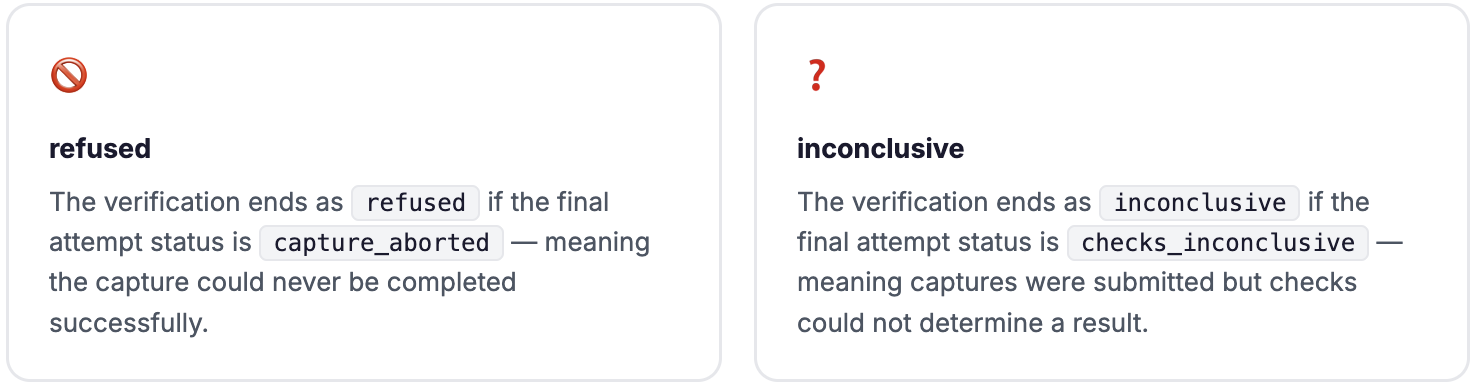
For a full breakdown of statuses and response codes, see the Identity Verification codes documentation.
Checkout IDV strengths